React is amazing, specifically React components are incredible. They add modularity, they help you organize your code much easier, and they give you an isolated environment to work on your code. At the same time components are not perfect at first glance. The biggest issue many people can have with components is accessing data in other components.
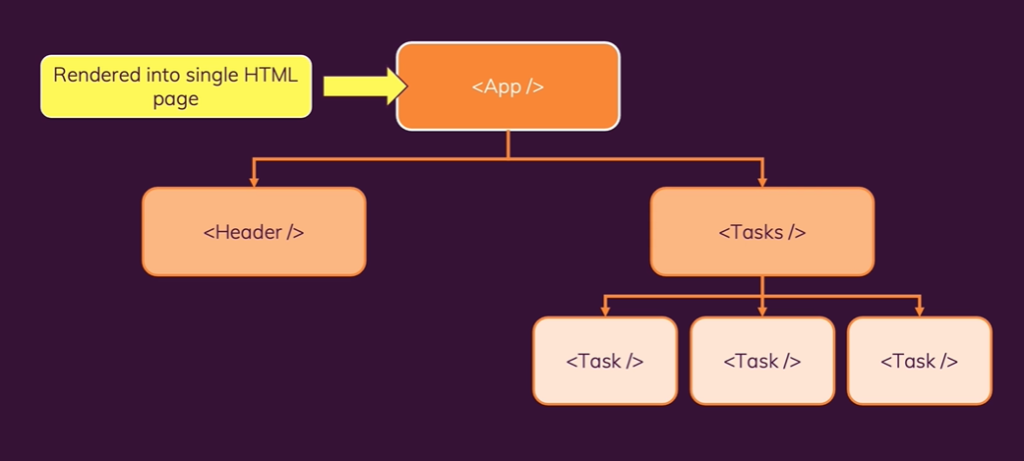
Components have a tree-like hierarchy as shown in the picture above. Components are like a family with parents, children, and siblings. In the tree the parent is always the component directly above and the children are below, so in this picture the App is the parent of Header and Tasks and each Task are children of Tasks and siblings to one another.
In React if information is needed in one of the components it needs to be passed down from parent to child as a prop, or properties. Siblings cannot pass information to one another and children cannot pass info up to the parent unless a callback function is used inside the parent component first and then sent to the child.
As you might have already figured out this can cause some real frustration if let’s say one sibling has information that another sibling needs. The only way you could do that is make sure all of that info is inside of the parent component and then pass it down to the siblings. It will inevitably make code more confusing and harder to keep track of whats going on with your code. Today I am not go into any more detail than that, so if you want to learn more about props and components visit Reacts main site here.
Today I will be talking about a way around that using a hook know as useContext. Prepare to make your life a whole lot easier!
useContext gives you a way around this component tree and allows you to pass information/properties to any component. I like to think of useContext as a waiter and a customer waiting to eat.

useContext allows us to create a provider (the waiter), a consumer (the customer), and the food (the information/properties). The information/props will be created in a new file (the kitchen).
So now that you can have some mental imagery in your head, let’s go through the steps on using useContext.
First, let’s create our new folder (kitchen) in VS Code where we can get our order ready for the consumer to take in. Inside of that folder you also need to create a file, name it whatever you want.

Inside of this file is where the magic happens.
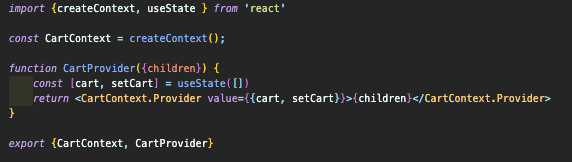
As you can see in the code above you need to import createContext from react. Then we need to set our createContext to a variable, in this code we are passing a cart state variable to multiple components, so we named ours CartContext.
Next, a function is provided with the prop of children to pass down the information/props we want to the consumers.
Inside of this function is where you can add whatever it is you want passed to your components. Since we wanted to pass a cart state variable and the setter function for that, we declare that variable in the function.
In the return statement is where the provider (waiter) can grab the values that need to be given to the consumer (customer). Use Yourcontext.Provider as a component and pass down the values you want and then {children} inside of that provider component. Export YourContext and YourProvider, and now everything is done in the kitchen(context file), lets see how your waiter (provider) gets this to your costumers (consumers).
Now we leave this folder and go into our index.js file and wrap our entire App in our Provider so every component can access our context.
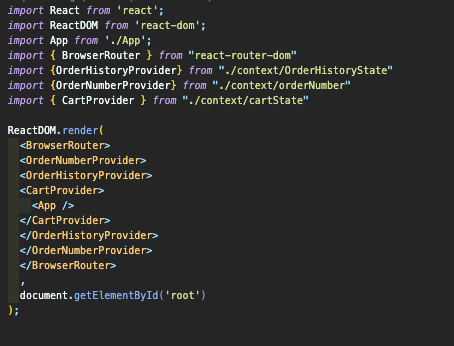
Aside from wrapping your App in your provider make sure to import this provider from is relative path as show above.
Now we can use this state variable in any component that I want, whether they are parents, children, siblings, cousins, aunts, friends, acquaintances, etc.. At this point it doesn’t matter, now the properties you set in your folder can be accessed anywhere. Now in order for that to be accessed you must import the context in whatever component you need it in, like so:

And then the final aspect you need is to bring your context into the component by using useContext and destructure out the values you would like to use, like so:

It can be confusing at first but give it a shot and play around with it and it will click and when it does, welcome to a much cleaner way to pass around props throughout your App.


 Bubba Blogs